Ảnh chụp store demo bản Pro, 19 thg 10, 2026. Ảnh sản phẩm trên store demo do AI tạo.
Hullara Drop
Storefront cho shop bán theo từng đợt drop có số, nơi chỉ tồn kho của bạn mới mở bán.
Hullara Drop
Giá founder tới 31 thg 12, 2026, sau đó là 199 US$.
Mua trọn đờiĐăng ký 19 US$/thángGói tháng là hình thức thuê: hết hạn thì storefront của bạn hiện thông báo licence cho tới khi gia hạn. Licence trọn đời thì không bao giờ.
Hullara Drop Pro
Hullara Drop, thêm các section cho những tuần giữa hai đợt phát hành.
Giá founder tới 31 thg 12, 2026, sau đó là 349 US$.
Mua trọn đờiĐăng ký 30 US$/thángGói tháng là hình thức thuê: hết hạn thì storefront của bạn hiện thông báo licence cho tới khi gia hạn. Licence trọn đời thì không bao giờ.
Mật khẩu store: 123
Merchant tiên phong. 20 store đầu tiên được chính developer setup theme cùng, miễn phí.
Gửi đơn nhận suất tiên phong30 ngày
Thử ngay trên store của bạn trước khi quyết định
- Tải file zip lên dưới dạng theme chưa publish. Storefront đang chạy của bạn không đổi gì.
- Xem thử với sản phẩm của bạn, nội dung của bạn, trên chính điện thoại của bạn.
- Chỉ publish khi bạn đã quyết định. Không hợp thì gửi email trong vòng 30 ngày, chúng tôi hoàn tiền đầy đủ.
- Tải về ngay sau khi thanh toán
- Cập nhật không mất tuỳ biến — hiện tại là v0.4.2
- Một cửa hàng đang chạy; key kích hoạt được tối đa 3 nơi, cho staging và khi chuyển store
- 20 loại app nằm sẵn bên trong — không phải thuê bao cái nào
- Không có server bản quyền đứng giữa shop và khách của bạn: mọi lỗi đều được hiểu là đủ bản quyền
- axe ở mức WCAG 2.1 AA, không lỗi nghiêm trọng, và toàn bộ đường mua chạy được chỉ bằng bàn phím
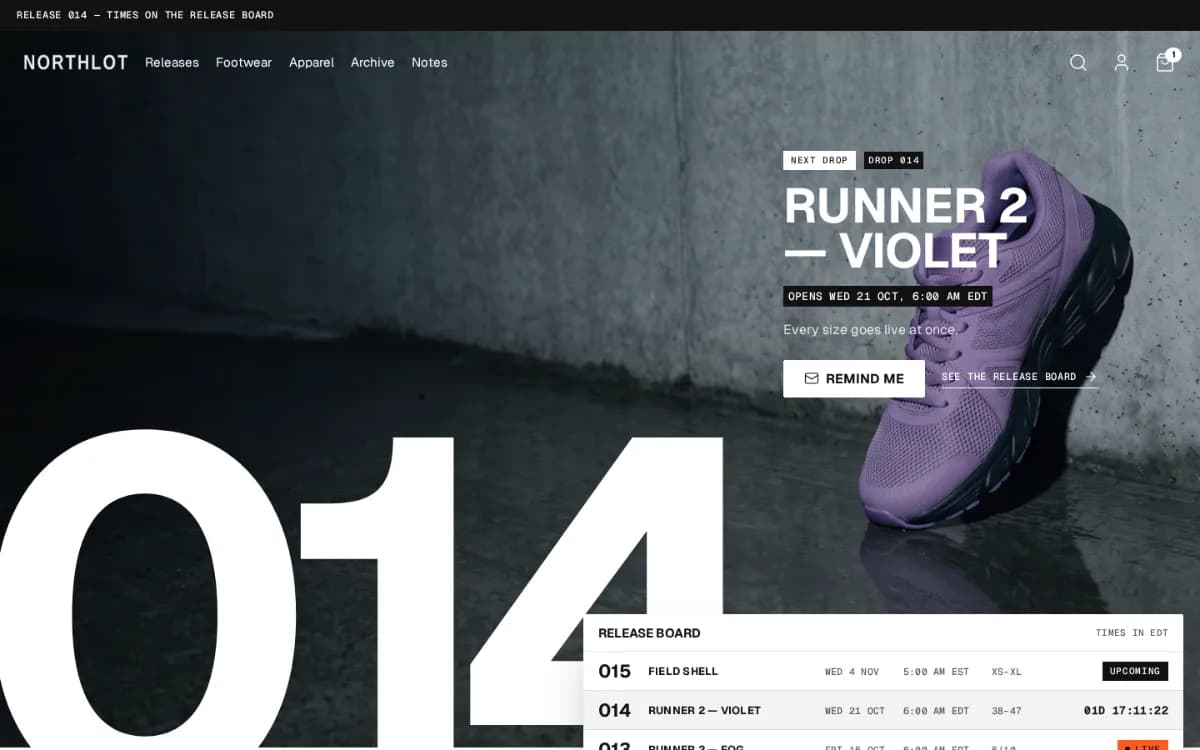
Hullara Drop là theme Shopify cho shop bán theo đợt — giày, streetwear, lô nhỏ — nơi cái gì sắp ra, cái gì đang bán và cái gì đã hết quan trọng không kém cả danh mục. Bảng phát hành, dòng phát hành trên trang sản phẩm và thẻ sản phẩm hiện size còn lại đều nằm trong theme, đọc từ ba metafield của sản phẩm và từ tồn kho của chính Shopify. Bên dưới là đúng phần lõi Hullara Apparel đang chạy: cùng trang sản phẩm, bộ lọc, tìm kiếm và cart drawer.
Xem theme chạy thật
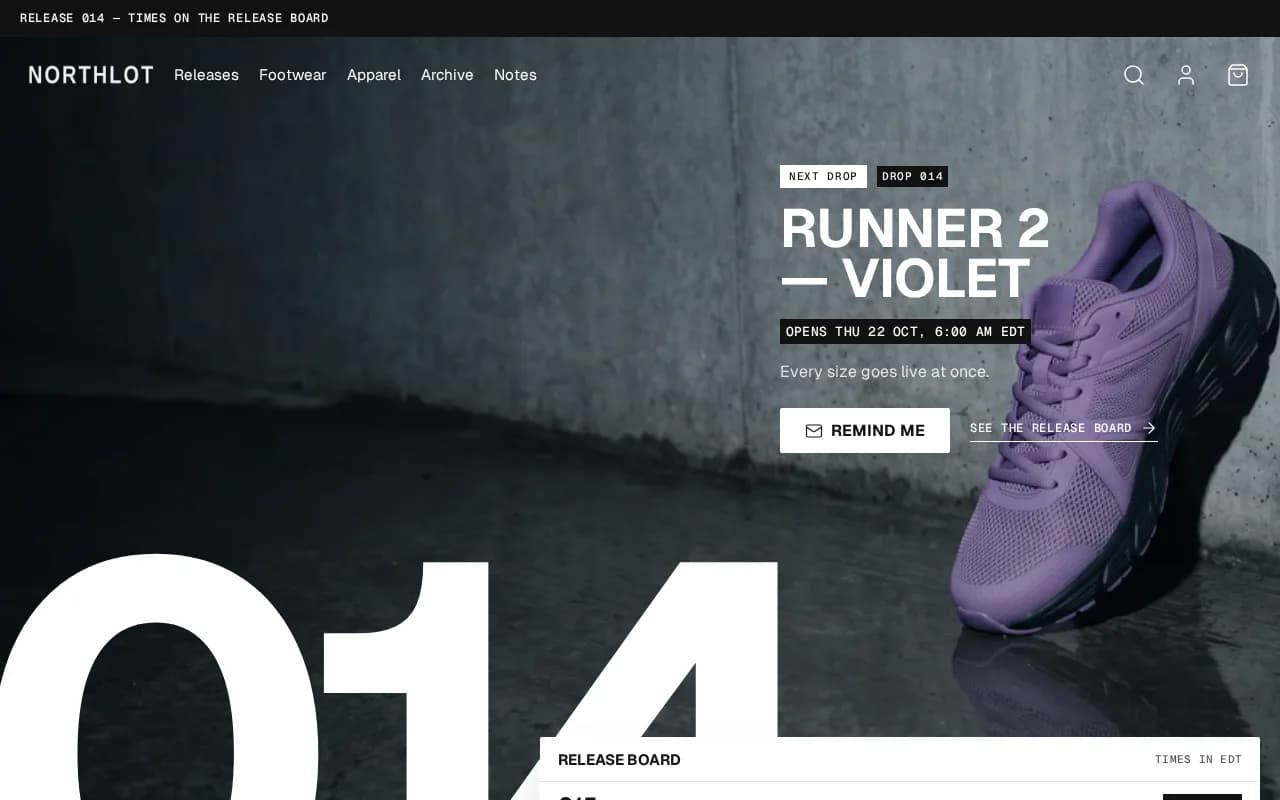
Hullara Drop Pro có thêm gì so với bản này
22 section và block chỉ có trong bản Pro, mỗi cái hiện bên dưới đúng như trên store demo.
Cả 22 cái, đúng như chúng hiện ra
Age gatesection Bundle dealsection Cart upsellsection Collection linkssection Comparison slidersection Comparison tablesection Content tabssection Countdown barsection Logo và trích dẫn của các báo đã viết về shop bạn, xếp thành hàng dưới banner chính. Bạn tự thêm từng cái trong theme editor, nên nó chỉ hiện đúng những bài báo bạn thật sự có.
Press coveragesection Promo popupsection Recently viewedsection Release calendarsection Shoppable imagesection Up nextsection Product complementaryblock Product countdownblock Product discount codeblock Product fitblock Product notify meblock Product quantity breaksblock Product release countdownblock Product tabsblock
Run promotions with real deadlines
- Countdown barsection
A site-wide band counting down to a date you set. When the deadline passes it renders nothing at all, rather than surviving as an empty coloured stripe.
- Product countdownblock
The same deadline on the product page, from the same snippet — so an expired offer disappears in both places or neither.
- Product discount codeblock
A code the shopper applies in one tap, instead of remembering it as far as the checkout.
- Promo popupsection
Email capture on a delay you set, rather than the moment the page loads.
Put more in every order
- Bundle dealsection
Buy-the-set offers assembled from products you already sell.
- Cart upsellsection
One relevant add-on in the cart, as theme code rather than a third-party script.
- Product quantity breaksblock
A volume ladder that sets the real quantity input and leaves the money to the cart — it prints no per-tier price, because only Shopify knows which discounts a given customer actually gets.
- Product complementaryblock
“Pairs well with” on the product page, from Shopify's own recommendations or a metafield you curate.
- Product notify meblock
A back-in-stock field under a sold-out size, posted through Shopify's own forms — to your inbox, or as a tagged customer a Flow can email on restock. The theme itself sends nothing.
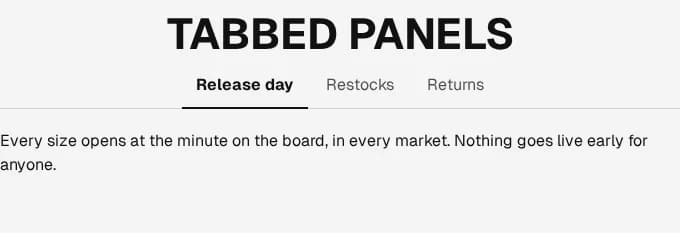
Help shoppers decide
- Comparison tablesection
A table putting your products side by side on the attributes that decide the sale.
- Comparison slidersection
A before-and-after slider, for a result two photographs can prove.
- Product tabsblock
The description split into tabs instead of one wall of text.
- Content tabssection
The same tabs for any content section, not only the product page.
- Recently viewedsection
The products a shopper looked at, remembered in their own browser and only with their consent, then drawn in one request.
- Press coveragesection
Quotes from the press, each naming the publication. It ships empty and shows nothing until you add a real one, so no placeholder quote goes live on a store that forgot it.
- Product fitblock
How a garment fits against the size a shopper usually wears, from a value you set per product. Until you set one it says nothing, so no product is called true to size by default.
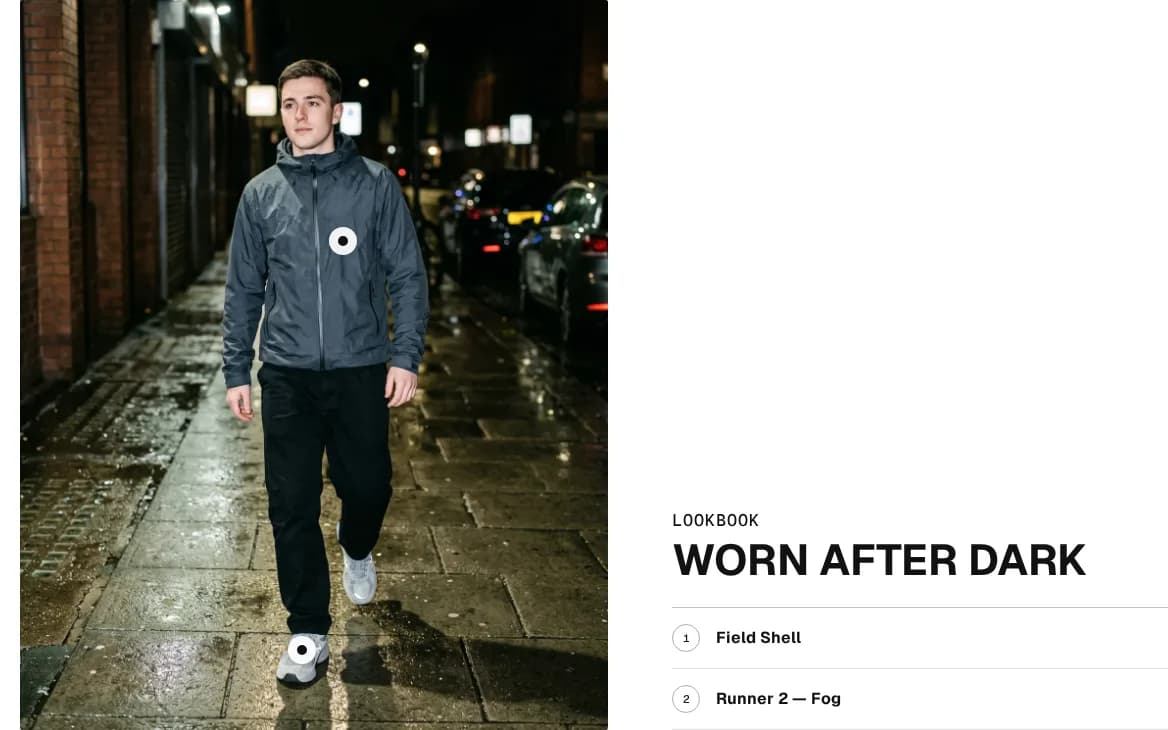
Merchandise the catalogue, and check age where the law asks
- Shoppable imagesection
A lookbook image with buyable hotspots placed on it.
- Collection linkssection
A row of your collections above the grid, taken from a menu you already keep, so it changes when your navigation does.
- Age gatesection
An age check in front of the storefront, for a catalogue that is required to have one.
Drops that open on their own
- Up nextsection
The next drop in full — its number, opening time, sizes, price, a countdown to that minute and a reminder form — beside the month around it. With nothing still to open it shows the calendar alone, and never invents a next date.
- Release calendarsection
A collection's drops laid out by the day they open, a month at a time, from each product's own opening date.
- Product release countdownblock
The time left before a drop opens, in the buy box. Zero opens nothing: the button stays closed until your stock says otherwise.
Hullara Drop Pro đắt hơn 100 US$, trả một lần — có mọi thứ của bản này, cộng toàn bộ phần trên.
Điểm khác biệt
Đồng hồ không bao giờ tự mở bán
Sản phẩm hiện “Opens” cùng ngày mở bán cho tới khi nó mua được trên Shopify, bất kể giờ trên trang là mấy; còn hàng bạn nhập sớm thì mở bán ngay. Một trang tự chuyển sang “live” đúng phút đã hẹn sẽ chào bán thứ checkout của bạn từ chối; ở đây chỉ tồn kho quyết định.
Sắp ra, đang bán và đã hết, trên cùng một bảng
Bảng phát hành đọc một collection bạn chọn và hiện số drop, ngày mở bán và trạng thái của từng sản phẩm — sắp mở, đang bán, pre-order, hết hàng hay lưu trữ — dưới dạng thẻ ảnh hoặc bảng.
Dựng trên phần lõi của Hullara Apparel
Trang sản phẩm dựng từ block, bộ lọc, tìm kiếm gợi ý, cart drawer và các ngôn ngữ storefront đều là của theme đó. Drop thêm section và giao diện riêng lên trên, không phải một codebase thứ hai.
Chi tiết từng tính năng
Phát hành
Ba metafield của sản phẩm — số drop, giờ mở bán, và có làm lại hay không — cùng tồn kho của Shopify quyết định mọi trạng thái theme hiện ra. Sản phẩm không có chúng là một sản phẩm bình thường.
Bảng phát hành cho trang chủ
Chọn một collection và bảng liệt kê các đợt phát hành của nó, ngày mở bán muộn nhất lên trước: thẻ ảnh có số drop, ngày và trạng thái, hoặc một bảng gồm ngày, giờ, drop, sản phẩm và trạng thái. Sản phẩm không có dữ liệu phát hành không lên bảng.
Dòng phát hành ở đầu trang sản phẩm
“Drop 013 · Live since Sat 3 Oct”, “Opens Thu 8 Oct, 10:00 AM UTC”, “Pre-order · ships by …”, “Sold out — more are coming” hay “Archive — not remade”. Dòng này đi theo variant đang hiện, vì pre-order là chuyện của từng variant.
Nhãn trên thẻ nói đúng sự thật
Sản phẩm chưa mua được hiện ngày mở bán trên thẻ thay vì “Sold out” — vốn nói điều ngược lại — và sản phẩm sẽ không làm lại hiện “Archive”.
Size còn lại, ngay trên thẻ
Dưới giá là số drop và dãy size, size đã hết bị gạch ngang — và được đọc là hết hàng cho trình đọc màn hình, để thông tin không chỉ nằm ở nét gạch. Sản phẩm chưa mua được thì không hiện dãy size.
Pre-order từ chính setting của Shopify
Variant vẫn bán khi tồn kho về 0 sẽ hiện “Pre-order” trên thẻ, trên dòng phát hành và trên nút mua, kèm ngày giao bạn đặt khi ngày đó còn ở phía trước. Nhập hàng lại là “Add to cart” quay về, không cần đụng tới theme.
Giao diện
Ba theme style
Clean, Poster và Night: một font hiển thị dạng hẹp, một font grotesque để đọc và một font monospace cho nhãn, trên nền màu xương, mực đen và một màu cam. Style chỉ đổi màu, font và hình khối: cookie banner, tiền tệ và swatch của bạn giữ nguyên.
Pro thêm những gì
Đây là các section và block có trong bản tải Pro và không có trong bản Core. Danh sách được đọc ra từ chính bản build của theme, nên nó là thứ thực sự nằm trong zip.
Size đã hết nhận email của khách
Khách chọn một size đã hết thì một ô email hiện ngay bên dưới. Mặc định nó gửi contact form của chính Shopify, nên yêu cầu về thẳng hộp thư của bạn kèm tên sản phẩm và size, và không ai bị đăng ký nhận gì cả.
- Hoặc gửi customer form kèm tag restock để Shopify Flow xử lý — khi đó form ghi rõ là nó đăng ký địa chỉ email, ngay cạnh nút
- Ô này đi theo size đang chọn, và biến mất khi khách chọn size còn hàng
Đồng hồ đếm ngược tới đúng ngày bạn đặt
Một thanh cho cả storefront và một block cho trang sản phẩm, cả hai đếm tới thời điểm kết thúc bạn nhập — không phải bộ đếm tự chạy lại cho mỗi khách, thứ mà cơ quan quản lý ở Anh và EU coi là hành vi gây hiểu lầm.
Mua ngay từ bức ảnh
Một tấm ảnh có chấm trên từng sản phẩm. Chạm vào một chấm là mở giá và nút thêm vào giỏ của sản phẩm đó mà không rời trang; trên điện thoại thẻ mở thành bottom sheet.
Mọi thứ có trong Hullara Drop
65 tính năng trong Hullara Drop và 94 trong Hullara Drop Pro — cái nào cũng bật trong theme editor, không cái nào là app.
Trang này chỉ có bản tiếng Anh.
| Tính năng | Core | Pro |
|---|---|---|
| Product bundles | — | ✓ |
| Quantity breaks | — | ✓ |
| Cart upsell | — | ✓ |
| “Pairs well with” on the product page | — | ✓ |
| “You may also like” | ✓ | ✓ |
| Free-shipping progress bar | ✓ | ✓ |
| A free-shipping threshold per currency | ✓ | ✓ |
| Gift wrap in the cart | — | ✓ |
| Tính năng | Core | Pro |
|---|---|---|
| Countdown to a real deadline | — | ✓ |
| Discount code, applied in one tap | — | ✓ |
| Email popup with exit intent | — | ✓ |
| Newsletter signup | ✓ | ✓ |
| Rotating announcement bar | ✓ | ✓ |
| Scrolling ticker | ✓ | ✓ |
| Tính năng | Core | Pro |
|---|---|---|
| Customer quotes | ✓ | ✓ |
| Logo row | ✓ | ✓ |
| Press coverage | — | ✓ |
| Promise row | ✓ | ✓ |
| FAQ section | ✓ | ✓ |
| Age verification | — | ✓ |
| Cookie consent that holds your pixels | ✓ | ✓ |
| Contact form with your own fields | ✓ | ✓ |
| Discourage image copying | ✓ | ✓ |
| Tính năng | Core | Pro |
|---|---|---|
| Drop hero | ✓ | ✓ |
| Release board | ✓ | ✓ |
| Release status on the product page | ✓ | ✓ |
| Countdown to a drop opening | — | ✓ |
| Release calendar | — | ✓ |
| Up next | — | ✓ |
| Release rules | ✓ | ✓ |
| Tính năng | Core | Pro |
|---|---|---|
| Country and language selectors | ✓ | ✓ |
| Currency codes on every price | ✓ | ✓ |
| Quick order list for B2B | ✓ | ✓ |
| B2B volume pricing | ✓ | ✓ |
40Các section có sẵn
Xem đầy đủ danh sách
- Announcement bar
- Apps
- Bento grid
- Cart drawer
- Collapsible content
- Collection list
- Consent banner
- Contact form
- Custom liquid
- Drop hero
- Featured collection
- Featured product
- Footer
- Header
- Icon bar
- Image banner
- Journal
- Logo list
- Main 404
- Main article
- Main blog
- Main cart
- Main collection
- Main list collections
- Main page
- Main password
- Main product
- Main search
- Multirow
- Newsletter
- Product recommendations
- Quick order list
- Quick view
- Release board
- Release rules
- Rich text
- Scroll to top
- Testimonials
- Ticker
- Video
55Các block có sẵn
Xem đầy đủ danh sách
- Announcement
- Button
- Cart body
- Cart footer
- Column
- Container
- Divider
- Footer brand
- Footer menu
- Footer newsletter
- Footer next drop
- Footer payment
- Footer social
- Footer text
- Footer wordmark
- Group
- Header drawer
- Header drawer body
- Header drawer foot
- Header drawer head
- Heading
- Icon
- Image
- Product badge
- Product buy buttons
- Product card
- Product collapsible
- Product colourways
- Product custom field
- Product delivery estimate
- Product description
- Product gallery
- Product inventory
- Product payment icons
- Product pickup
- Product price
- Product quantity
- Product rating
- Product release
- Product selling plan
- Product size chart
- Product sku
- Product specs
- Product sticky atc
- Product stock meter
- Product title
- Product trust badges
- Product variant note
- Product variant picker
- Product volume pricing
- Slide
- Slider
- Spacer
- Text
- Video
Ngôn ngữ: en, ar, bg, cs, da, de, el, es, fi, fr, he, hr, hu, id, it, ja, ko, nb, nl, pl, pt-BR, pt-PT, ro, sk, sl, sv, th, tr, vi, zh-CN, zh-TW
Lịch sử phát hành
v0.4.2
- The licence check now loads after your page does, off the path a visitor's first view takes.
- Previewing the theme no longer counts as installing it on that store.
2 bản phát hành trước
v0.4.1
- Each download is made for the store you name when you download it: install it on that store. A second store, a staging copy included, takes its own download from your licence page.
- The hero's words stay readable over a light picture.
v0.4.0
- The first release of Hullara Drop.
- Thirty-one storefront languages, three theme styles to start from, and the theme editor in the twenty-two languages Shopify's admin offers.
- Search engines read the shop as it is: one page heading per page, products with sizes or colours described as one group, and article dates in your shop's time zone.
Từ blog
Những gì chúng tôi dựng, và cách chúng tôi kiểm thử
Câu hỏi thường gặp
Core và Pro khác nhau thế nào?
Pro là theme này cộng thêm các section và block có tên ở phía trên trang — trong đó có ô nhận email của khách cho một size đã hết. Bản Core đơn giản là không chứa file Pro, và mọi thứ trên trang này đều có trong nó.
Đợt phát hành có tự mở đúng giờ ghi trên trang không?
Không, và đó chính là chủ ý. Ngày giờ là điều theme báo cho khách; đợt phát hành mở khi sản phẩm mua được trên Shopify — khi nó có hàng, hoặc được đặt là vẫn bán khi hết hàng. Không có gì trên storefront tự mở bán đúng phút ghi trên trang.
Dữ liệu phát hành lấy từ đâu?
Ba metafield của sản phẩm trong namespace hullara: drop_number (text), drop_opens_at (ngày và giờ) và restock (true hoặc false — false là thứ biến một sản phẩm hết hàng thành hàng lưu trữ). Bạn khai báo chúng ở Settings › Metafields and metaobjects trong admin Shopify rồi điền cho từng sản phẩm.
Tôi có cần app nào không?
Không, cho mọi thứ trên trang này. Pre-order là setting vẫn-bán-khi-hết-hàng của chính Shopify. Điều theme không làm được là giới hạn số lượng mỗi khách hay tổ chức bốc thăm: checkout quyết định ai được mua, storefront chỉ nói điều đúng.
Chuyện gì xảy ra nếu tôi ngừng trả tiền?
Licence trọn đời dùng mãi mãi. Licence theo tháng là thuê: khi hết kỳ đã trả, licence hết hiệu lực, không tải được nữa và storefront hiện thông báo licence cho tới khi bạn gia hạn. Thẻ bị từ chối thì không — có mười bốn ngày ân hạn trước đó. Mua licence trọn đời nếu bạn muốn theme là của bạn dù sau này ra sao.
Theme có những ngôn ngữ nào?
31 ngôn ngữ, nằm trong file zip — đủ danh sách ở mục Ngôn ngữ trên trang này. Cấu trúc của chúng được build kiểm tra chứ không phải mắt người — bản dịch nào làm rơi một dạng số nhiều hay mất một giá trị nội suy là lỗi build, không phải cảnh báo. Điều chúng chưa có là một người bản ngữ đọc lại giọng văn, và chúng tôi nói rõ điều đó ở trang bằng chứng.