Bỏ qua, tới nội dung

Tính năng

Shopify notify me when available, without an app

Shopify can collect a notify me when available request without an app: a form under a sold-out size, sent through Shopify's own forms — to your inbox, or as a tagged customer a Shopify Flow email can reach. Hullara Pro has the form in every theme; sending the email when the size is back is a job for Shopify Flow, Shopify's email automations or an app.

Trang này chỉ có bản tiếng Anh.

Back-in-stock request là gì?

A back-in-stock request is a form under a sold-out size where a shopper leaves an email to hear when it returns. On Shopify a theme can collect the request with Shopify's own forms; sending the email when the stock comes back is a job for Shopify Flow, Shopify's email automations or an app.

By , who builds the Hullara theme

· · How we test and write these pages

Collecting the request needs no app

A back-in-stock request has two halves. Collecting it — an email address and which size it is for — is a form, and Shopify already has the forms. Sending the email when the size comes back is a job for something that sends: Shopify Flow, Shopify's email automations, or an app.

This block does the first half, through one of Shopify's two storefront forms, chosen in the theme editor:

  • As a message to you (the default). The request reaches your store's inbox like any contact message, naming the product, the size, its SKU and a link to it. Nothing to set up, and nobody is subscribed to anything.
  • As a customer. The address is saved on a customer tagged restock and restock-<variant id>, for a workflow or a customer segment to find. Shopify gives a theme no way to tag a customer without subscribing the address to email marketing, so the form says so in so many words, beside the button.

On the product page

The form appears under a size that is sold out and nowhere else, and the confirmation takes its place when the request is sent — before any script loads, or without one.
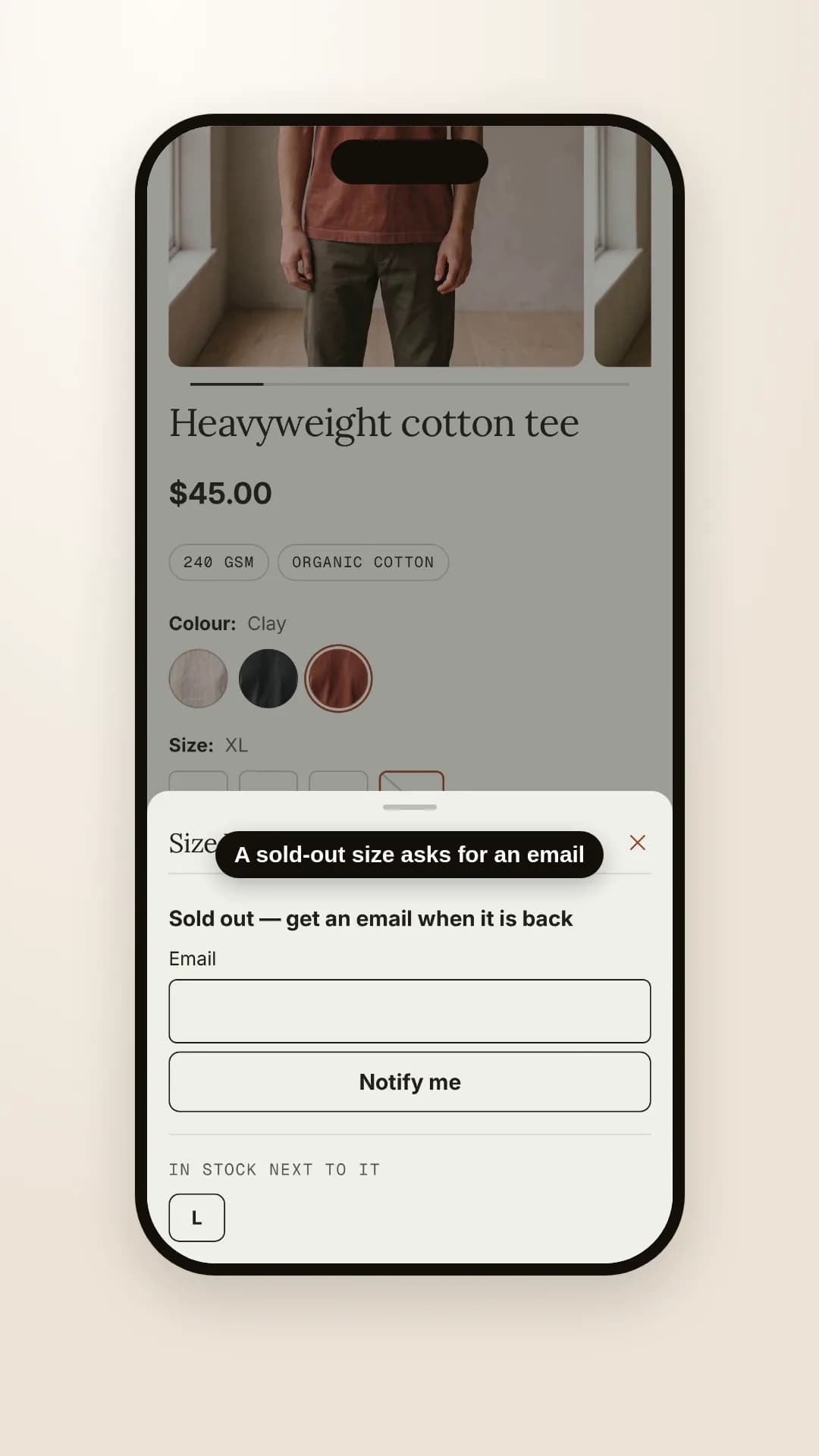
A tee's product page on a phone: the shopper picks the Clay colour and the sold-out XL size, a sheet rises asking for an email, and the size beside it that is in stock is offered as a button
On screen: A sold-out size asks for an email · And names the sizes beside it that are in stock. Silent screen recording of Hullara Apparel Pro 0.4.0 on a Shopify development store, 21 October 2026.

On a phone, pressing a sold-out size raises the form as a sheet over the page rather than growing it under a buy button that is already off screen, and the sheet offers the sizes either side that are in stock. From a tablet up it is the same form in place.

It never shows under a product you have marked as not made again. And on Hullara Drop, a release that has not opened yet shows the same form asking to be reminded when it opens (launch countdown).

Sending the email when it is back

Shopify Flow has a trigger for exactly this moment, Product variant back in stock: it starts a workflow when a variant's stock goes from zero or less to one or more, on a product whose inventory is tracked. From there:

  • To tell yourself, Flow's Send internal email action writes to the addresses you type in — it is meant for staff.
  • To tell the shopper, the Shopify Messaging connector's Send Marketing Email action sends to customers subscribed to email marketing, which is why the customer option subscribes them.

All three read on the Shopify Help Center, 21 October 2026. Which customers asked for which size is in their tags; the workflow that finds them and sends the email is yours to build, and we have not built it on our demo store.

What still needs an app

  • An email that sends itself with no workflow to build. That is most of what a back-in-stock app sells.
  • Text messages and push notifications, and counts of how many people are waiting for each size.
  • A deposit on a pre-order. Hullara takes pre-orders through Shopify's own keep-selling setting; a deposit or a part payment needs an app.

Which themes have it

Every Hullara theme, in Pro. Hullara Apparel, for clothing stores, places it right under the buy button, below the size picker and its size chart, so a shopper who picks a sold-out size finds the form where they were about to buy.

Những câu người ta thật sự hỏi

Do I need an app for back-in-stock requests?

Not to collect them: the form posts Shopify's own contact or customer form. To email the shopper automatically when the size is back, something has to send it — a Shopify Flow workflow with the Shopify Messaging connector, or an app.

Where does a request go?

You choose in the theme editor. As a message, it reaches your store's inbox naming the product, the size and its SKU, with a link. As a customer, the shopper's address is saved on a customer tagged restock and restock-<variant id>, which Shopify Flow or a customer segment can find.

Does the customer option sign shoppers up for marketing?

Yes. Shopify gives a theme no way to tag a customer without subscribing the address to email marketing, so the form says so in so many words beside the button.

Does the theme send the back-in-stock email?

No. Shopify Flow can start a workflow when a variant's tracked stock goes from zero or less to one or more, and its Shopify Messaging connector can send a marketing email to subscribed customers. Building that workflow is yours; we have not built it on our demo store.

What does a shopper see on a phone?

Pressing a sold-out size raises the form as a sheet over the page, with the sizes either side that are in stock as buttons. From a tablet up, and without JavaScript, it is the same form in place under the buy button.

Which themes have it?

Every Hullara theme, in Pro. On Hullara Drop the same form asks to be reminded when a release opens, before it has ever been on sale.

Cho phép chúng tôi đếm lượt xem trang này bằng Google Analytics chứ? Bấm từ chối thì không có gì bạn nhìn thấy thay đổi, và chúng tôi vẫn biết trang này được đọc — chỉ là không biết người đọc là bạn. Không có cookie quảng cáo trong cả hai trường hợp. Chính xác thì chúng tôi lưu gì