Bỏ qua, tới nội dung

Tính năng

Shopify subscription options on the product page

Subscribe or buy once beside the price, from the selling plans your subscription app sets up — priced on each option, and working before any script loads.

Trang này chỉ có bản tiếng Anh.

Subscriptions là gì?

On Shopify a subscription is a selling plan: a delivery schedule and a price that a subscription app attaches to a product. The theme's part is showing those plans beside the price and sending the one the shopper picked with the cart line; the app bills the renewals.

By , who builds the Hullara theme

· How we test and write these pages

Who does what in a Shopify subscription

A subscription on Shopify has two halves, and they belong to different people.

The app's half. A subscription app — Shopify's own Shopify Subscriptions is free on its App Store listing (read 20 October 2026) — creates the plans ("Every 2 weeks, 10% off"), charges the card on each renewal, and gives your customers a page to pause, skip or cancel. Shopify calls each plan a selling plan and keeps it on the product.

The theme's half. Showing those plans on the product page, beside the price, and sending the one the shopper picked along with the product into the cart. That is this block. It does not create a plan or bill anybody, and no theme can: a plan only exists once an app has made it.

Knowing the split saves money. Subscription apps usually sell a product-page widget as part of the plan; the widget is the theme's half, and a theme that does it already leaves the app to do what only it can.

Subscribe or buy once, priced where the choice is

The block shows one-time purchase and the subscription side by side. The plans of a group sit together as one card — its name, its price and a row of delivery choices — so "every 2 weeks" and "every 4 weeks" are one tap apart.
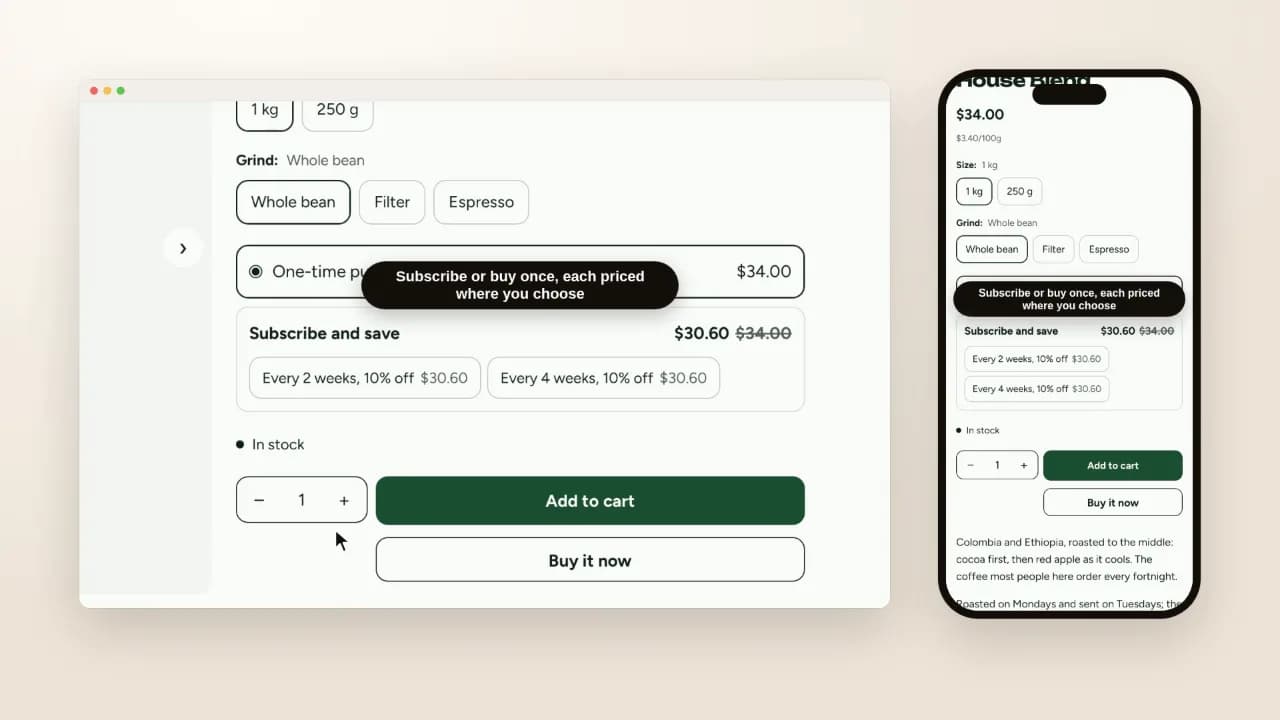
A coffee product page with one-time purchase at $34.00 above a Subscribe and save card at $30.60 with the $34.00 struck through, two delivery choices, and the chosen plan shown under the product in the cart drawer
On screen: Subscribe or buy once, each priced where you choose · The plans come from your subscription app · The plan rides on the cart line to checkout. Silent screen recording of Hullara Replenish 0.4.0 on a Shopify development store, 20 October 2026.

Each option carries its own price. The one-time price sits beside one-time, the plan's price beside the plan, with the regular price struck through when the plan saves money. The main price at the top of the page does not change while the shopper compares; the comparison is where the decision is.

Two details that matter on a real catalogue:

  • Plans can differ by variant. A 1 kg bag may be on a plan the 250 g bag is not, at a different price. The block follows the variant the shopper picked.
  • Subscription-only products have no one-time option. Shopify marks them as requiring a plan, and offering a one-time purchase anyway would send an order the checkout refuses.

A sold-out variant shows its plans but cannot be subscribed to until it is back.

No script on the buying path

The choices are part of the product form itself, so the plan reaches the cart in the same request as the variant and the quantity — with JavaScript or without it. On a product with no plans the block renders nothing at all; there is no empty widget waiting for an app.

In the cart and at checkout

The plan's name rides on the cart line ("Every 2 weeks, 10% off") and on through checkout. From the first renewal on, it is the app's.

Which themes have it

Every Hullara theme has the block, in Core and in Pro. Hullara Replenish is built around it: coffee, supplements and refills, sold on a schedule, with a box builder in Pro for the shopper who wants to choose what goes in.

Những câu người ta thật sự hỏi

Do I still need a subscription app?

Yes. The plans, the renewals and the page where customers pause or skip belong to a subscription app — Shopify's own Shopify Subscriptions app is free. The theme shows the plans that app creates and sends the chosen one to the cart; it does not bill anybody.

Which subscription apps does it work with?

Any app that sets up Shopify selling plans, which is how Shopify Subscriptions and the subscription apps built on Shopify's subscription APIs offer a plan on a product. The block reads the plans from the product, not from one app.

What if a product can only be bought on subscription?

Then there is no one-time option. Shopify marks such a product as requiring a selling plan, and the block follows it, because offering a one-time purchase there would send an order the checkout refuses.

Where does the subscription price show?

On each option, where the shopper is choosing — the one-time price beside one-time and the plan's price beside the plan, with the regular price struck through when the plan saves money. The main price above it does not change under the shopper's eyes.

Does it need JavaScript?

No. The choices are part of the product form, so the subscription reaches the cart with or without scripts. It renders nothing at all on a product with no plans.

Which themes have it?

Every Hullara theme, Core and Pro. Hullara Replenish — made for coffee, supplements and the things a household orders again — is built around it.

Cho phép chúng tôi đếm lượt xem trang này bằng Google Analytics chứ? Bấm từ chối thì không có gì bạn nhìn thấy thay đổi, và chúng tôi vẫn biết trang này được đọc — chỉ là không biết người đọc là bạn. Không có cookie quảng cáo trong cả hai trường hợp. Chính xác thì chúng tôi lưu gì