Screenshots of the Pro demo stores, Oct 19, 2026. Product photos on the demo stores are AI-generated.
Hullara Drop
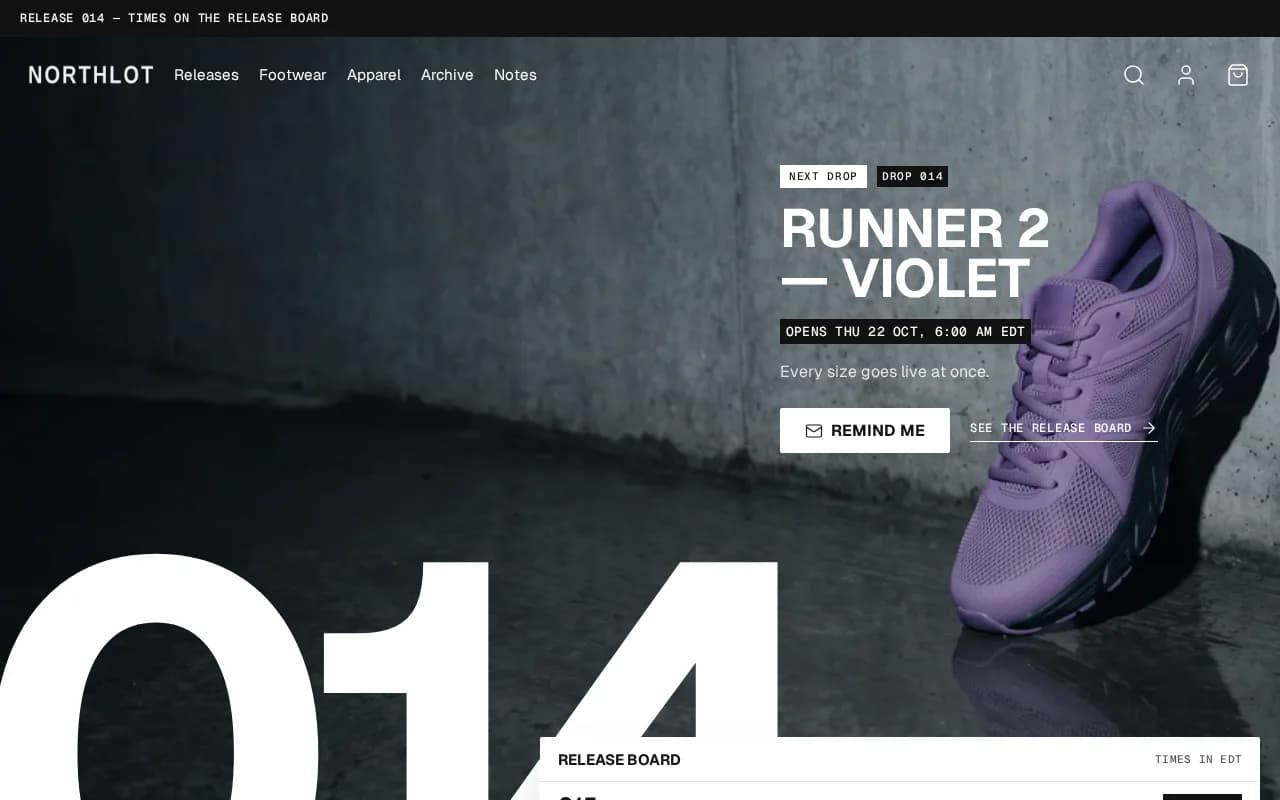
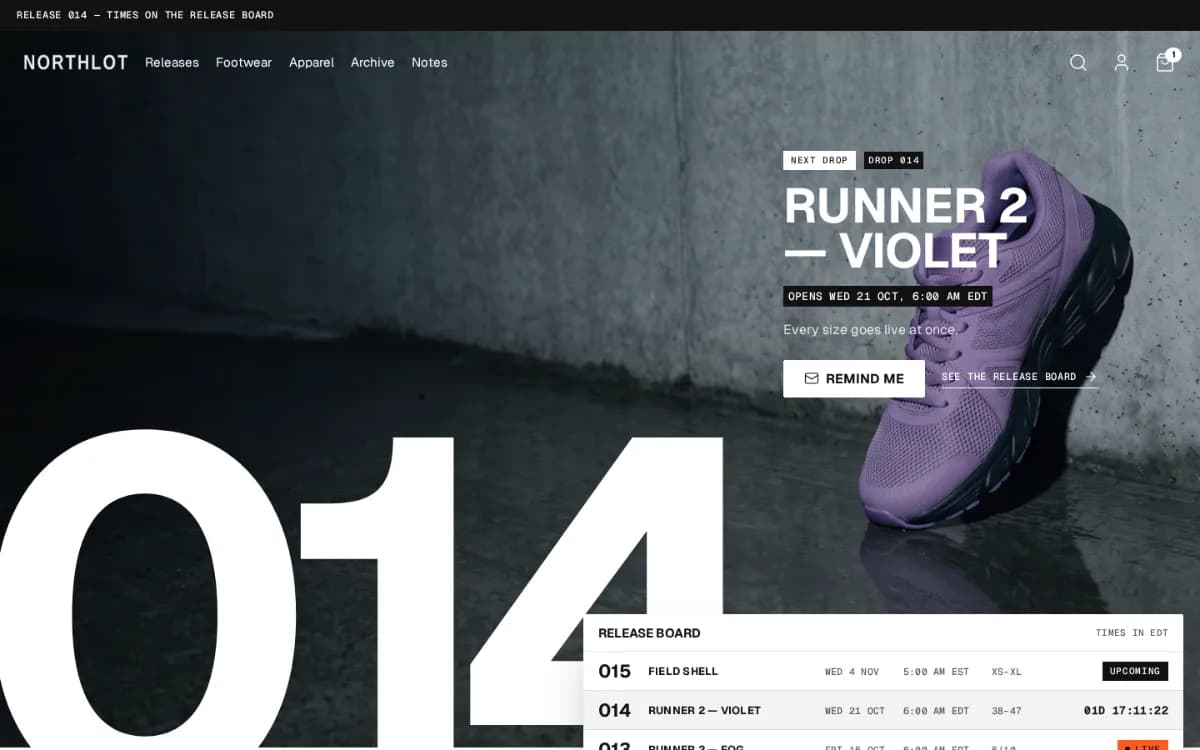
Hullara Drop is a Shopify theme for product drops: each product shows upcoming, live or sold out from its opening date and its stock, so only your stock opens a release. A release board, a drop hero and your release rules are in both editions; Pro adds a countdown to the opening and a way for shoppers to be reminded.
Hullara Drop
Founder price until Dec 31, 2026, then $199.
Buy lifetimeSubscribe $19/monthMonthly is a rental: if it lapses, your storefront shows a licence notice until you renew. A lifetime licence never does.
Hullara Drop Pro
Hullara Drop, plus the sections for the weeks between releases.
Founder price until Dec 31, 2026, then $349.
Buy lifetimeSubscribe $30/monthMonthly is a rental: if it lapses, your storefront shows a licence notice until you renew. A lifetime licence never does.
Store password: 123
Founding merchants. Our first 20 stores get the theme set up with them by its developer, free.
Apply for a founding place30 days
Try it on your own store before you commit
- Upload the zip as an unpublished theme. Your live storefront does not change.
- Preview it with your own products, your own copy, on your own phone.
- Publish only once you have decided. If it is not right, email us within 30 days and we refund you in full.
- Instant download after payment
- Updates that keep your customisations — currently v0.4.2
- One live store; the key activates on up to 3, for staging and a move
- 20 kinds of app built in — no subscription for any of them
- No licence server between your shop and your customers: every failure means fully licensed
- axe at WCAG 2.1 AA, zero serious violations, and the whole purchase path works from the keyboard
Hullara Drop is a Shopify theme for a shop that sells in releases — trainers, streetwear, small runs — where what is coming, what is live and what is gone matters as much as the catalogue. A release board, a release line on the product page and cards that show the sizes left are part of the theme, read from three product metafields and from Shopify's own stock. Underneath it is the core Hullara Apparel runs on: the same product page, filtering, search and cart drawer.
See it moving
What Hullara Drop Pro adds over this edition
22 sections and blocks that come only with Pro, each shown below as it renders on the demo store.
All 22, as they render
Age gatesection Bundle dealsection Cart upsellsection Collection linkssection Comparison slidersection Comparison tablesection Content tabssection Countdown barsection Logos and quotes from the publications that wrote about your shop, in a row under your hero. You add each one in the theme editor, so it shows only the coverage you really have.
Press coveragesection Promo popupsection Recently viewedsection Release calendarsection Shoppable imagesection Up nextsection Product complementaryblock Product countdownblock Product discount codeblock Product fitblock Product notify meblock Product quantity breaksblock Product release countdownblock Product tabsblock
Run promotions with real deadlines
- Countdown barsection
A site-wide band counting down to a date you set. When the deadline passes it renders nothing at all, rather than surviving as an empty coloured stripe.
- Product countdownblock
The same deadline on the product page, from the same snippet — so an expired offer disappears in both places or neither.
- Product discount codeblock
A code the shopper applies in one tap, instead of remembering it as far as the checkout.
- Promo popupsection
Email capture on a delay you set, rather than the moment the page loads.
Put more in every order
- Bundle dealsection
Buy-the-set offers assembled from products you already sell.
- Cart upsellsection
One relevant add-on in the cart, as theme code rather than a third-party script.
- Product quantity breaksblock
A volume ladder that sets the real quantity input and leaves the money to the cart — it prints no per-tier price, because only Shopify knows which discounts a given customer actually gets.
- Product complementaryblock
“Pairs well with” on the product page, from Shopify's own recommendations or a metafield you curate.
- Product notify meblock
A back-in-stock field under a sold-out size, posted through Shopify's own forms — to your inbox, or as a tagged customer a Flow can email on restock. The theme itself sends nothing.
Help shoppers decide
- Comparison tablesection
A table putting your products side by side on the attributes that decide the sale.
- Comparison slidersection
A before-and-after slider, for a result two photographs can prove.
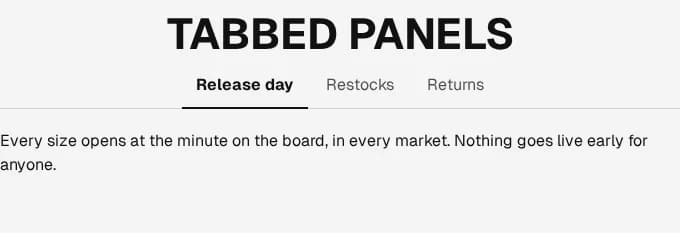
- Product tabsblock
The description split into tabs instead of one wall of text.
- Content tabssection
The same tabs for any content section, not only the product page.
- Recently viewedsection
The products a shopper looked at, remembered in their own browser and only with their consent, then drawn in one request.
- Press coveragesection
Quotes from the press, each naming the publication. It ships empty and shows nothing until you add a real one, so no placeholder quote goes live on a store that forgot it.
- Product fitblock
How a garment fits against the size a shopper usually wears, from a value you set per product. Until you set one it says nothing, so no product is called true to size by default.
Merchandise the catalogue, and check age where the law asks
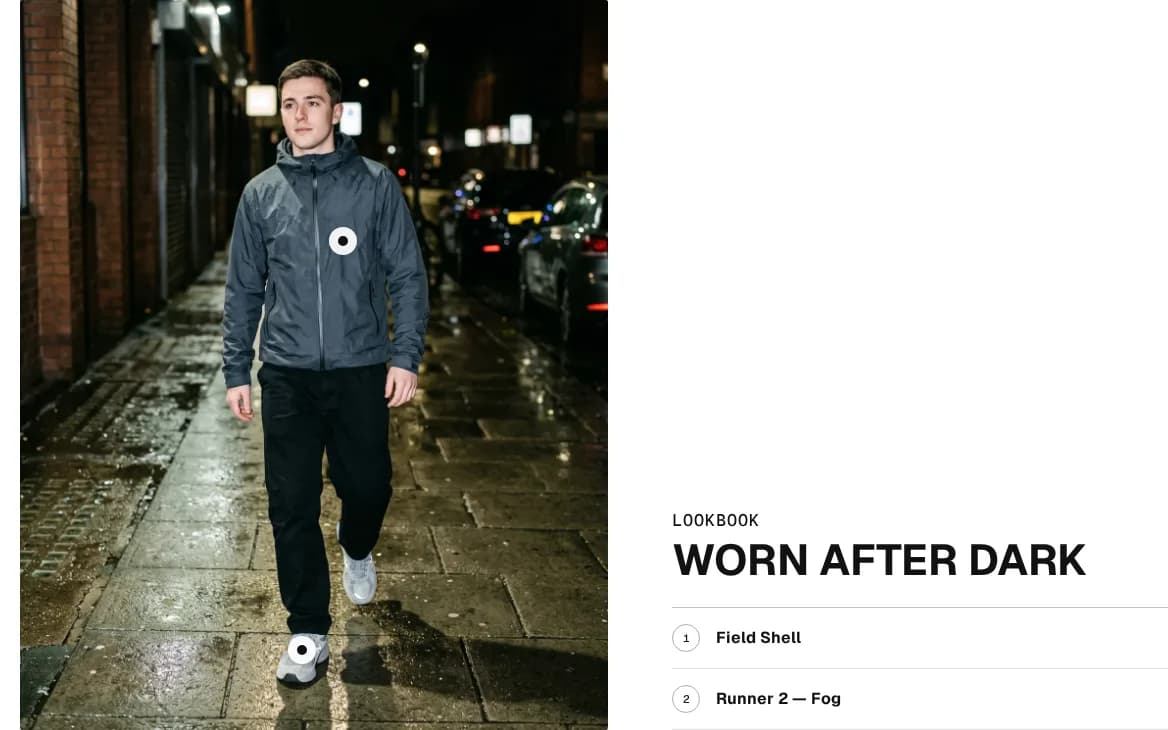
- Shoppable imagesection
A lookbook image with buyable hotspots placed on it.
- Collection linkssection
A row of your collections above the grid, taken from a menu you already keep, so it changes when your navigation does.
- Age gatesection
An age check in front of the storefront, for a catalogue that is required to have one.
Drops that open on their own
- Up nextsection
The next drop in full — its number, opening time, sizes, price, a countdown to that minute and a reminder form — beside the month around it. With nothing still to open it shows the calendar alone, and never invents a next date.
- Release calendarsection
A collection's drops laid out by the day they open, a month at a time, from each product's own opening date.
- Product release countdownblock
The time left before a drop opens, in the buy box. Zero opens nothing: the button stays closed until your stock says otherwise.
Hullara Drop Pro is $100 more, once — everything in this edition, plus all of the above.
What makes it different
A drop goes live when your stock does, not when a timer says
A product reads “Opens” with its date until it can be bought in Shopify, whatever the time on the page, and one you stock early is live at once. A page that switched itself to “live” at a set minute would offer what your checkout refuses; here only your stock decides.
What is coming, what is live and what is gone, on one board
The release board reads a collection you choose and shows each product's drop number, opening date and state — upcoming, live, pre-order, sold out or archive — as picture cards or as a table.
Built on the core of Hullara Apparel
The block-built product page, faceted filtering, predictive search, the cart drawer and the storefront languages are the ones that theme ships. Drop adds its own sections and its own look on top, not a second codebase.
Every feature, in detail
Releases
Three product metafields — the drop's number, when it opens, and whether it will be made again — and Shopify's own stock decide every state the theme shows. A product without them is an ordinary product.
A release board for the homepage
Choose a collection and the board lists its releases, latest opening date first: picture cards with the drop number, date and state, or a table of date, time, drop, product and status. A product with no release data is left off it.
A release line at the top of the product page
“Drop 013 · Live since Sat 3 Oct”, “Opens Thu 8 Oct, 10:00 AM UTC”, “Pre-order · ships by …”, “Sold out — more are coming” or “Archive — not remade”. It follows the variant on screen, because pre-order is a fact of the variant.
Card badges that say what is true
A product that cannot be bought yet reads its opening date on its card rather than “Sold out”, which says the opposite, and one that will not be remade reads “Archive”.
The sizes left, on the card
Under the price, the drop's number and the size run, with the sizes that are gone struck through — and announced as sold out to a screen reader, so it does not rest on the line alone. A product that cannot be bought shows no run.
Pre-order from Shopify's own setting
A variant that keeps selling past zero stock reads “Pre-order” on its card, its release line and its button, with the ship-by date you set while that date is still ahead. Restock it and “Add to cart” comes back without touching the theme.
The look
Three theme styles
Clean, Poster and Night: a condensed display face, a grotesque for reading and a monospace for labels, set in bone, ink and one orange. A style changes colours, fonts and shapes only: your cookie banner, currency and swatch choices stay as you set them.
What Pro adds
What you get on top of Core: the sections and blocks below come only in the Pro download, each one switched on from the theme editor.
A sold-out size takes an email
Pick a size that is gone and an email field appears under it. By default it posts Shopify's own contact form, so the request lands in your inbox naming the product and the size, and nobody is subscribed to anything.
- Or post the customer form with a restock tag a Shopify Flow can act on — the form then says it subscribes the address, beside the button
- It follows the size on screen, and leaves when the shopper picks one in stock
Countdowns that run to a date you set
A bar for the whole storefront and a block for the product page, both counting to an end time you enter — not to a timer that restarts for every visitor, which regulators in the UK and the EU treat as a misleading practice.
Shop the photograph
A shot with a dot on each product in it. Tapping one opens that product's price and add-to-cart without leaving the page; on a phone the card is a bottom sheet.
Everything in Hullara Drop
65 features in Hullara Drop and 94 in Hullara Drop Pro — each one switched on in the theme editor, none of them an app.
| Feature | Core | Pro |
|---|---|---|
| Product bundles | — | ✓ |
| Quantity breaks | — | ✓ |
| Cart upsell | — | ✓ |
| “Pairs well with” on the product page | — | ✓ |
| “You may also like” | ✓ | ✓ |
| Free-shipping progress bar | ✓ | ✓ |
| A free-shipping threshold per currency | ✓ | ✓ |
| Gift wrap in the cart | — | ✓ |
| Feature | Core | Pro |
|---|---|---|
| Countdown to a real deadline | — | ✓ |
| Discount code, applied in one tap | — | ✓ |
| Email popup with exit intent | — | ✓ |
| Newsletter signup | ✓ | ✓ |
| Rotating announcement bar | ✓ | ✓ |
| Scrolling ticker | ✓ | ✓ |
| Feature | Core | Pro |
|---|---|---|
| Customer quotes | ✓ | ✓ |
| Logo row | ✓ | ✓ |
| Press coverage | — | ✓ |
| Promise row | ✓ | ✓ |
| FAQ section | ✓ | ✓ |
| Age verification | — | ✓ |
| Cookie consent that holds your pixels | ✓ | ✓ |
| Contact form with your own fields | ✓ | ✓ |
| Discourage image copying | ✓ | ✓ |
| Feature | Core | Pro |
|---|---|---|
| Drop hero | ✓ | ✓ |
| Release board | ✓ | ✓ |
| Release status on the product page | ✓ | ✓ |
| Countdown to a drop opening | — | ✓ |
| Release calendar | — | ✓ |
| Up next | — | ✓ |
| Release rules | ✓ | ✓ |
| Feature | Core | Pro |
|---|---|---|
| Country and language selectors | ✓ | ✓ |
| Currency codes on every price | ✓ | ✓ |
| Quick order list for B2B | ✓ | ✓ |
| B2B volume pricing | ✓ | ✓ |
40Sections included
List every one
- Announcement bar
- Apps
- Bento grid
- Cart drawer
- Collapsible content
- Collection list
- Consent banner
- Contact form
- Custom liquid
- Drop hero
- Featured collection
- Featured product
- Footer
- Header
- Icon bar
- Image banner
- Journal
- Logo list
- Main 404
- Main article
- Main blog
- Main cart
- Main collection
- Main list collections
- Main page
- Main password
- Main product
- Main search
- Multirow
- Newsletter
- Product recommendations
- Quick order list
- Quick view
- Release board
- Release rules
- Rich text
- Scroll to top
- Testimonials
- Ticker
- Video
55Blocks included
List every one
- Announcement
- Button
- Cart body
- Cart footer
- Column
- Container
- Divider
- Footer brand
- Footer menu
- Footer newsletter
- Footer next drop
- Footer payment
- Footer social
- Footer text
- Footer wordmark
- Group
- Header drawer
- Header drawer body
- Header drawer foot
- Header drawer head
- Heading
- Icon
- Image
- Product badge
- Product buy buttons
- Product card
- Product collapsible
- Product colourways
- Product custom field
- Product delivery estimate
- Product description
- Product gallery
- Product inventory
- Product payment icons
- Product pickup
- Product price
- Product quantity
- Product rating
- Product release
- Product selling plan
- Product size chart
- Product sku
- Product specs
- Product sticky atc
- Product stock meter
- Product title
- Product trust badges
- Product variant note
- Product variant picker
- Product volume pricing
- Slide
- Slider
- Spacer
- Text
- Video
Languages: en, ar, bg, cs, da, de, el, es, fi, fr, he, hr, hu, id, it, ja, ko, nb, nl, pl, pt-BR, pt-PT, ro, sk, sl, sv, th, tr, vi, zh-CN, zh-TW
Release history
v0.4.2
- The licence check now loads after your page does, off the path a visitor's first view takes.
- Previewing the theme no longer counts as installing it on that store.
2 earlier releases
v0.4.1
- Each download is made for the store you name when you download it: install it on that store. A second store, a staging copy included, takes its own download from your licence page.
- The hero's words stay readable over a light picture.
v0.4.0
- The first release of Hullara Drop.
- Thirty-one storefront languages, three theme styles to start from, and the theme editor in the twenty-two languages Shopify's admin offers.
- Search engines read the shop as it is: one page heading per page, products with sizes or colours described as one group, and article dates in your shop's time zone.
From the blog
What we built, and how we tested it
Questions
What is the difference between Core and Pro?
Pro is this theme plus 22 extra sections and blocks, listed by name further up this page — among them the form that takes a shopper's email for a sold-out size. The Core download simply does not contain the Pro files, and everything on this page is in it.
Does a release open at the time on the page?
No, and that is the point. The date is what the theme tells shoppers; a release opens when the product can be bought in Shopify — when it has stock, or is set to keep selling without it. Nothing on the storefront goes live on its own at the minute on the page.
Where does the release data come from?
Three product metafields in the hullara namespace: drop_number (text), drop_opens_at (date and time) and restock (true or false — false is what makes a sold-out product an archive piece). You define them under Settings › Metafields and metaobjects in the Shopify admin and fill them in on each product.
Do I need any apps?
Not for anything on this page. Pre-order is Shopify's own keep-selling setting. What a theme cannot do is enforce a limit per customer or run a raffle: checkout decides who may buy, and the storefront only says what is true.
What happens if I stop paying?
A lifetime licence keeps working forever. A monthly licence is a rental: when the period you have paid for ends, the licence lapses, downloads stop and your storefront shows a licence notice until you renew. A failed card does not do that — fourteen days of grace come first. Buy the lifetime licence if you want the theme to be yours whatever happens later.
What languages does the theme ship in?
31, in the zip — every one is listed under Languages on this page. Their structure is checked by the build rather than by eye — a translation that drops a plural form or loses an interpolated value is a build error, not a warning. What they have not had is a native speaker's read for register and idiom, and we say so on the evidence page.