The button follows the stock, not a clock
The usual way to hold a launch is a script: a countdown on the page, and when it reaches zero the script switches Add to cart on. That only changes the page. Whether a product can be bought is decided by Shopify — it has stock, or it is set to keep selling without it — and when the page and the stock disagree, the shopper finds out at checkout.
Hullara Drop holds a launch the other way round. The product stays unbuyable until launch, which Shopify already knows how to enforce, and the page says when that ends. Add to cart appears the moment Shopify says the product can be bought, whatever the countdown shows. Stock, not the clock is the longer story of that rule.
Before it opens
Give the product its opening time in a product metafield, hullara.drop_opens_at, and
leave it without stock. Until that time the product page shows:
- The opening time on the release line above the title: the drop's number, then "Opens" with the day and the time.
- No buy button. Not a greyed-out one, and not "Sold out": the product has never been on sale, and a disabled button reads as a broken page. In Pro, what the shopper can do instead takes its place:
- A countdown in the buy box (Pro): days, hours, minutes and seconds to that same minute, the same instant for every visitor, with a line of your own under it.
- A reminder form under the countdown (Pro): "Get an email when Drop 015 opens", and a Remind me button.
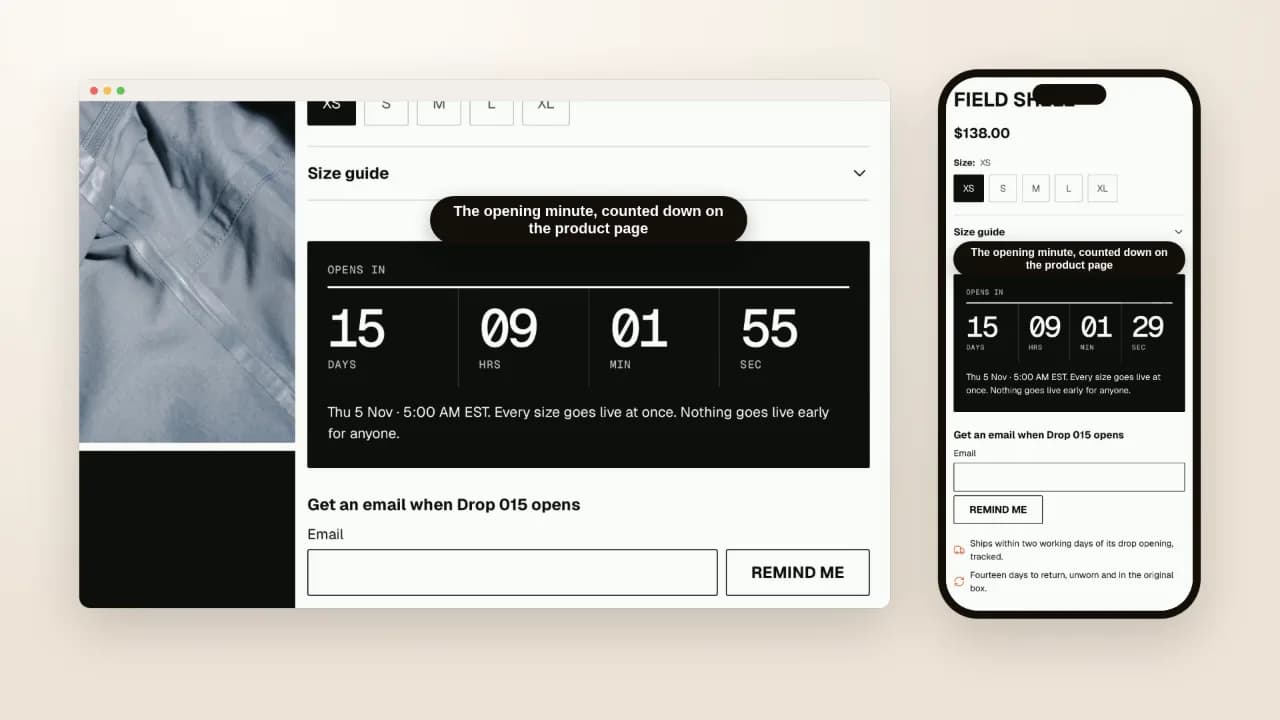
The reminder uses Shopify's own forms, and you choose which: a message in your inbox, or a
customer tagged release and release-<product id>. The second subscribes the address to
email marketing — Shopify gives a theme no way to tag a customer without it — and the form
says so beside the button. Sending the email when the launch opens is a job for Shopify Flow
or your email app; the theme sends nothing.
At the minute it opens
The countdown stops at zero, and that is all it does. To open the release, put the stock in:
- By hand, the product's inventory in the Shopify admin, at the minute.
- On Shopify Plus, Shopify's Launchpad app can "increase inventory levels at the start of an event" (Shopify Help Center, read 21 October 2026), so the stock lands on time without anyone at a keyboard.
- Early, if the stock is ready: the product is on sale at once, and the page does not wait for its own countdown.
If the minute passes and the stock is not there, the product reads sold out, never live. That is the honest state, and it is why nothing on the page can sell what the checkout would refuse.
What Shopify does without a theme
If you only need the product hidden until launch, Shopify can do that on its own. Future publishing hides a product from your online store until a date and time you set, then publishes it (Shopify Help Center, read 21 October 2026). Nobody sees it before, so there is no page to share, no countdown and no list of people waiting — which is what this page is for.
What still needs an app
- A raffle, a queue or bot protection. A launch that needs those needs an app built for them.
- A limit per customer. The theme cannot hold a shopper to one pair.
- The reminder email itself, as above: Shopify Flow or your email app.
Which themes have it
Hullara Drop, made for limited releases. Core shows when a release opens on the product page and on the release board, with no buy button until then. Pro adds the countdown in the buy box, the reminder form, an Up next section with the next drop in full, and a release calendar of the month's drops.
The other Hullara themes read the same opening time. A product with one still ahead keeps its button, closed, reading "Opens" with the date instead of "Sold out".