Saltar al contenido

Función

Shopify build a box without an app

You can build a box on Shopify without an app when the theme has a box page: shoppers pick six or twelve from a collection and add them as one box, grouped in the cart, and the box price is your own Shopify discount, applied at checkout. Hullara has it in the Pro edition of Replenish, with nothing extra to install.

Esta página solo está disponible en inglés.

¿Qué es Build a box?

A build-a-box page lets a shopper choose a set number of products from a collection — six coffees, twelve snacks — and add them to the cart together as one box. Hullara's adds the picks as ordinary cart lines marked as one box; any box price is a Shopify discount you set up.

En estos temasHullara Replenish

By , who builds the Hullara theme

· · How we test and write these pages

Pick, count, add as one box

A box page shows the products of one collection with an Add under each. The tray beside them counts the picks against the size of the box — six, or twelve — adds up the prices, and opens Add box to cart when the box is full. One press puts the whole box in the cart.
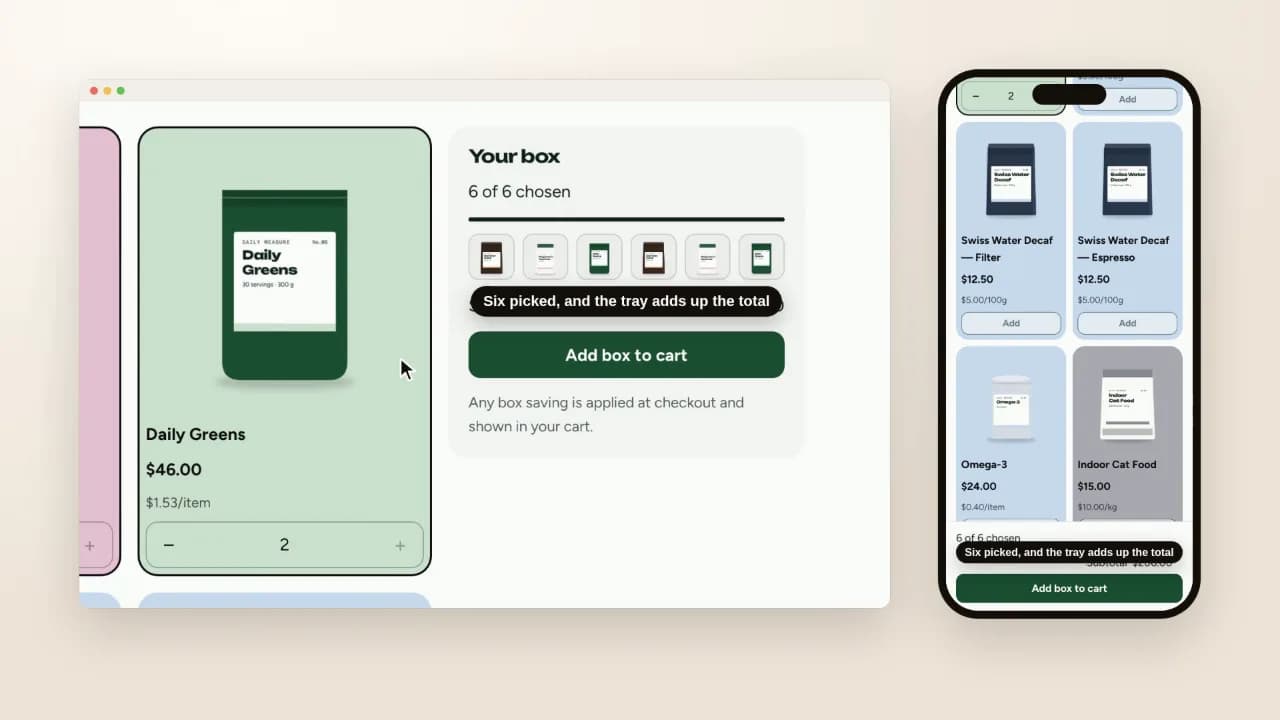
A box page on a desktop and a phone: six picks from a collection of coffee, supplements and pet food fill the tray, and Add box to cart puts them in the cart drawer as one box of six with a Remove box link and the store's own box discount on each line
On screen: Six picked, and the tray adds up the total · One box in the cart, removed as one. Silent screen recording of Hullara Replenish Pro 0.4.0 on a Shopify development store, 21 October 2026.

Three details that matter on a real catalogue:

  • Every variant is its own pick. A coffee sold whole bean and ground appears as both, named by its options, so the box never chooses a grind for the shopper. Sold-out variants are left out: a box is filled from what can be sent.
  • The box stays a box in the cart. Its lines are drawn together under one heading with one Remove box, and two boxes holding the same coffee stay two boxes.
  • Sizes are yours to set. A box of six and a box of twelve are two sizes on the same page; with only one there is nothing to choose and no chooser.

The box price is a Shopify discount

The page adds up the prices and shows that total. It never writes a saving, because the theme does not decide one: a box price is your own automatic discount, set up in Shopify — for example on the box's collection, from six items — and applied at checkout, where the cart shows it before the shopper pays.

One thing to know before you set it up. A discount on the box's collection also applies to those products bought one at a time, outside a box. Limiting a saving to boxes needs a Shopify Function, which is what a bundle app brings.

What Shopify does without a theme

Shopify's free Bundles app, on every plan, makes fixed bundles and multipacks: a box whose contents you choose, sold as one product with its own inventory. Its help page describes no box that the shopper fills (Shopify Help Center, read 21 October 2026). If every box is the same, that is the simpler answer.

What still needs an app

  • A box sold as one product, with its own price, SKU and stock — Shopify's Bundles app does this for a fixed box.
  • A saving that applies to boxes only, as above.
  • A box on subscription, refilled with the shopper's choices every month.

Which themes have it

Hullara Replenish, in Pro — made for coffee, supplements and the things a household orders again, beside the subscription choice on its product pages.

Preguntas que se hacen de verdad

Do I need an app to sell a build-your-own box on Shopify?

Not for a box the shopper fills from a collection: Hullara Replenish Pro has a box page that does it. An app is the answer for a box sold as one product with its own price and stock, a box on subscription, or a saving that applies to boxes and nothing else.

How is the box discounted?

The page adds up the prices and shows a total, never a saving. A box price is your own automatic discount — for example on the box's collection, from six items — applied at checkout and shown in the cart. A discount on that collection also applies to its products bought one at a time; limiting a saving to boxes takes a Shopify Function, which comes with an app.

What does the cart show?

The box's lines together as one group with one Remove box. Two boxes holding the same coffee stay two boxes.

Can a shopper choose the grind or the size inside the box?

Yes. Every variant that can be bought is its own pick, named by its options, so the box never chooses a grind for the shopper. Sold-out variants are left out: a box is filled from what can be sent.

Can I offer more than one box size?

Yes, one per size — a box of six and a box of twelve are two. With a single size there is nothing to choose, and no chooser is drawn.

Which themes have it?

Hullara Replenish, in Pro — made for coffee, supplements and the things a household orders again.

¿Podemos contar esta visita con Google Analytics? Si dices que no, nada de lo que ves cambia, y seguimos sabiendo que la página se leyó — solo que no que fuiste tú. Ninguna cookie publicitaria en ningún caso. Qué guardamos, exactamente