Saltar al contenido

Función

Shopify quick view without an app

Shopify quick view without an app is built into every Hullara theme, Core and Pro: a shopper opens a product from a collection card, picks a size and adds it, without leaving the grid or losing their place in it. There is no app and no extra script — the dialog shows the product page you already configured, fetched only when the shopper presses the button.

Esta página solo está disponible en inglés.

¿Qué es Quick view?

Quick view is a dialog that opens over a collection grid showing one product's images, options and buy button, so a shopper can add a size without a page load. Hullara opens it by fetching the product's real page, so what you see in the dialog is the product page you already configured.

By , who builds the Hullara theme

· · How we test and write these pages

What it is for

A shopper scanning forty products in a grid finds one they might want. Without quick view, checking it costs a page load out of the grid, a look, and a press of the back button that may or may not return them to the same scroll position. Most do not come back.

Quick view is the dialog that removes that trip: images, options, price, add to cart, over the grid, with the grid still behind it.

The dialog is your product page

This is the part worth knowing before comparing it with an app.

Hullara does not maintain a second, simplified product layout for the dialog. It fetches the product's own page — the real URL, the one that always exists — and lifts the product layout out of the response. Whatever you arranged on the product page is what a shopper sees in the dialog: your blocks, in your order, with your settings.

There is no second design to keep in step, and therefore no way for the two to drift apart. A theme that renders a bespoke quick-view layout has two product pages to maintain and only tells you about one of them.

Why it fetches a whole page

The tempting alternative is to ask Shopify for just the section, which is smaller. It does not work reliably, and the reason is specific: a section id in a JSON template is scoped to that template, so from a collection page there is no way to name the product template's section. Asking for one that is not there answers 404 — and the failure is invisible in development, because the id happens to match when you test from the product page itself.

So it asks for the page, which always exists, and pays a full page of HTML for a deliberate click. Nothing is fetched until somebody presses the button, so a shopper who never opens one downloads nothing extra.

Off means gone, not hidden

Turning quick view off removes the buttons. It does not render them and hide them with CSS.

That distinction is invisible on screen and obvious with a keyboard: a hidden button is still in the tab order, so a keyboard user tabs through forty controls that do nothing on a grid where the merchant switched the feature off. It is a small thing that only shows up if you use the site the way some of your customers do.

On a collection page
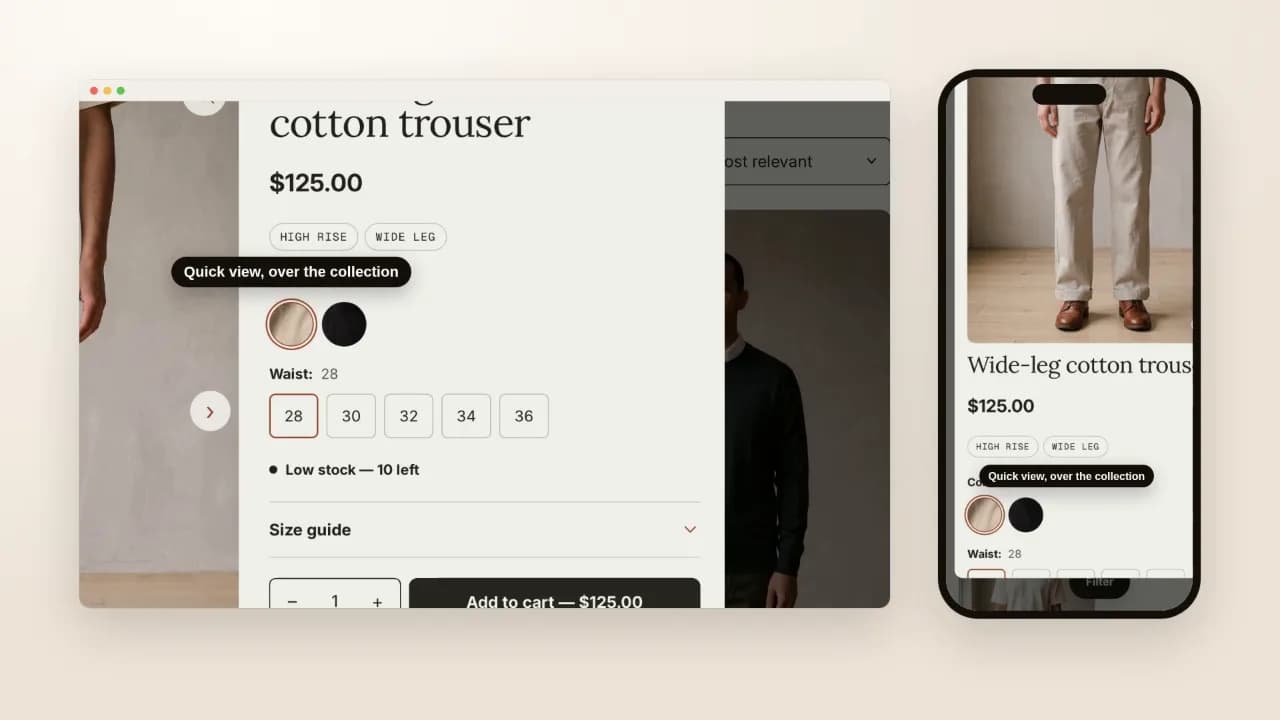
A clothing collection on a desktop and a phone: a card's quick view opens over the grid with the product's pictures, colours, sizes and buy button, a size is chosen in place, and Escape closes it back onto the grid
On screen: The product opens without leaving the collection. · Quick view, over the collection · An option is chosen in place. Silent screen recording of Hullara Apparel 0.4.0 on a Shopify development store, 21 October 2026.

Opened from a card, an option chosen inside the dialog, and closed with Escape onto the grid the shopper was already reading.

Which edition

Both. Quick view is part of the merchandising layer every edition ships, not one of the Pro-only sections. The pricing page has the full split.

On the product page itself, the same edition replaces three more apps, each with a page showing how to build it into Dawn or Horizon yourself: a size chart, a sticky add-to-cart bar and a free-shipping bar. Everything else is on the features page.

See Hullara Apparel

Preguntas que se hacen de verdad

Do I need an app for quick view on Shopify?

No. Quick view is theme behaviour — a dialog, a fetch and a buy form — and Hullara ships it in both editions. Apps exist for it because most themes do not have one, and each app adds a script to every page of your storefront to provide it.

Is the dialog a separate design I have to maintain?

No, and that is the point of how it is built. It fetches the product's own page and lifts the product layout out of it, so whatever you arranged on the product page — the blocks, the order, the settings — is what appears in the dialog. There is no second layout to keep in step, and no way for the two to disagree.

What does it cost the page?

One request, made when somebody presses the button, and it fetches a full product page rather than a fragment. That is a deliberate trade: asking for a fragment means guessing an id that depends on which template the shopper came from, and guessing wrong answers 404. A whole page of HTML for a click that saves a navigation is the right side of it, and nothing is fetched until the click.

Can I turn it off?

Yes, and turning it off removes the buttons rather than hiding them. A control that is off should not still be in the tab order for a keyboard user, which is what `display: none` on a rendered button would leave behind.

Which edition has it?

Both. Quick view is in Core and in Pro — it is part of the cart and merchandising layer that every edition ships, not one of the Pro-only sections.

¿Podemos contar esta visita con Google Analytics? Si dices que no, nada de lo que ves cambia, y seguimos sabiendo que la página se leyó — solo que no que fuiste tú. Ninguna cookie publicitaria en ningún caso. Qué guardamos, exactamente